Actions
Bug #1909
openFeature #1858: GBG Dashboard
User can approve a document without providing the mandatory fields
Status:
In Progress
Priority:
Immediate
Assignee:
-
Category:
Employee History
Target version:
-
Start date:
04/02/2020
Due date:
% Done:
0%
Description
Steps:
1. Go to dashboard or employee certificates page
2. Click on Approve icon corresponding to any document
3. Click on Approve button without providing anything in the approve grid
ER: User should be shown that the mandatory fields are empty
AR: User is able to approve without providing approval name and date
Video Link: https://www.screencast.com/t/TaqV0YMAh
Files
Updated by Mark Moon over 6 years ago
- Status changed from New issue to In Progress
- Assignee set to Mark Moon
Updated by Mark Moon over 6 years ago
- Status changed from In Progress to Needs Testing
- Assignee deleted (
Mark Moon)
Updated by Bhavya B about 5 years ago
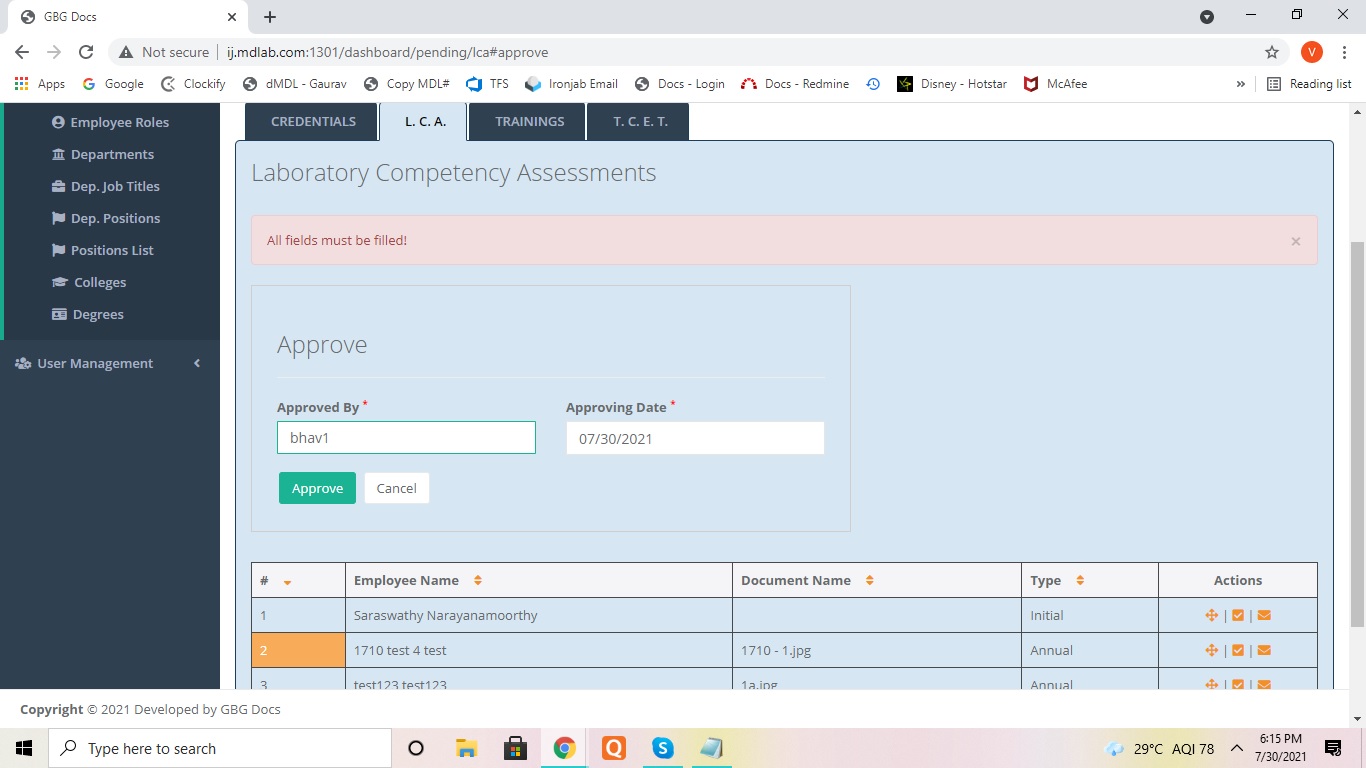
- File all fields must be filled.jpg all fields must be filled.jpg added
- Status changed from Needs Testing to In Progress
User is not able to approve documents in LCA, Training and TCET module.
User shown a message "All fields must be filled!" even though user has provided the approved by and approving date fields
Actions